Learn the basics of trading, risk and strategy design first
Work through the Learn courses in an order that matches the tools, with no account needed to read.
To learn the basics before you trade or build strategies, work through the Learn courses in order, from market basics to risk, strategy building and testing. They are free to read without an account, and signing in saves your progress.
Who this is for and what you get
This guide is for you if terms like R-multiple, expectancy, drawdown or overfitting are new, or if you want a refresher before you build and test strategies. You end up with a reading path that matches the tools in QuantRaider, and you know which course to open when you get stuck on a metric.
Before you start
Nothing. The Learn pages are public. You can read lessons without logging in. If you sign in, the app saves your progress to your account, and it is the same on any device. See Create an account and log in.
1. Open Learn
Open Learn, or choose Learn in the sidebar. At the top, the page tells you where to start. When you are signed in it offers to continue where you left off.
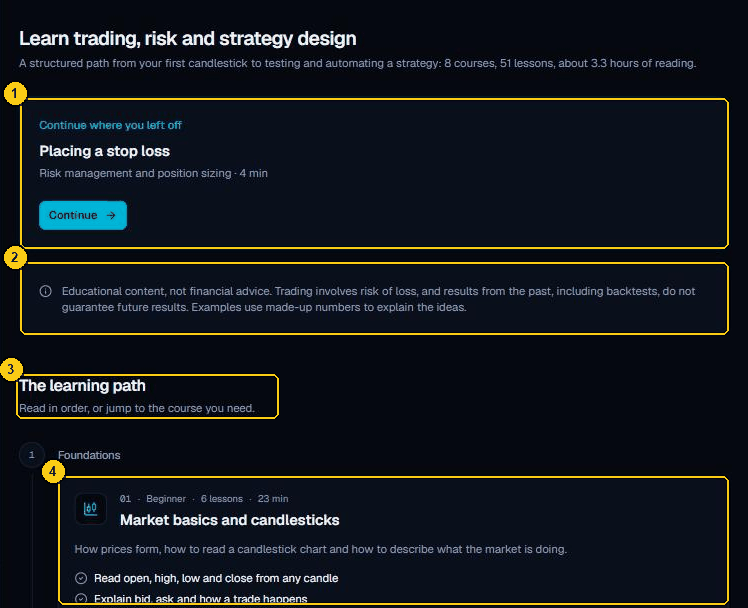
- Continue where you left off takes you back to your last lesson. It appears when you are signed in.
- The note that the material is educational and not financial advice.
- The learning path lists the courses in order.
- A course card with its level, number of lessons and reading time.
2. Follow the learning path
The page lists courses in stages. Read in order, or jump to the course you need.
| Stage | Course | Useful when you |
|---|---|---|
| Foundations | Market basics and candlesticks | are new to charts. |
| Foundations | Orders, spreads and costs | wonder why live results differ from a backtest. |
| Risk | Risk/reward and expectancy | want to understand Expectancy and R in Analysis. |
| Risk | Risk management and position sizing | need to choose risk per trade and understand drawdown. |
| Strategy building | Technical indicators | use SMA, EMA, RSI, MACD or ATR nodes in a graph. |
| Strategy building | Building strategies as node graphs | are about to use the graph editor. |
| Testing and analysis | Backtesting properly | want to avoid overfitting and trust a result. |
| Going live | Analysis and going live safely | are thinking about a demo account or a broker. |
3. Take a course
- Choose a course card. The button says Start course, Continue course or Review course.
- Open a lesson. Each shows its reading time, in minutes.
- Move on with Previous and Next at the bottom of a lesson. The outline of the course is beside the lesson on wide screens and under Course outline on narrow ones.
- Some lessons have interactive examples, such as a small simulation of a series of trades.
Each course ends with a quiz. Choose an answer, then Check answer, then Next question, and finally See results. Choose Retake quiz to try again. A completed lesson is marked Completed when you are signed in.
4. Match a course to your goal
- Before Test a trading idea by hand: the courses on market basics and on backtesting properly.
- Before Build a graph and backtest it automatically: the courses on technical indicators and on building strategies as node graphs.
- Before Find the best stop loss and take profit or Find out when your strategy works: risk/reward and expectancy, and backtesting properly. The lesson on overfitting is the one to read.
- Before Combine strategies and check how they correlate: risk management and position sizing.
- Before Go live with a backtested strategy on cTrader: analysis and going live safely, then Risks of live trading.
5. Use what you learn in the app
Reading is the start. Build a small strategy and place trades by hand, and then check the same ideas against your own trades. The risk figures in the Key metrics panel of the Analysis tab are the same ideas as in the risk courses.
Common problems
- Lesson not found: the link points to a lesson that does not exist or has moved. Choose Back to all courses.
- Your progress does not show: sign in. Progress is saved only for signed-in users.